Skylight Calendar Reviews: The Ultimate 27-Inch Family Organizer
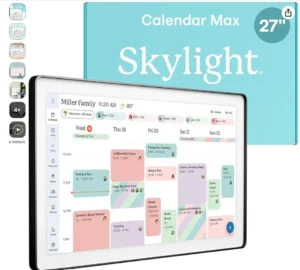
The Skylight Calendar Max is not merely a digital screen; it is a combination of a Smart Digital Calendar and a Chore Chart. Its large 27-inch HD touchscreen display is so vibrant that it remains clearly visible from any corner of the house. Featuring a Charcoal Shadowbox frame, this device looks just like a modern framed picture on your wall, fitting seamlessly in both portrait and landscape modes.
Technical Specifications
| Feature | Details |
| Brand | Skylight |
| Amazon Rating | ⭐⭐⭐⭐⭐ 4.6/5 Stars |
| Display Size | 27-Inch HD Touchscreen |
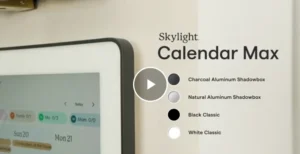
| Frame Style | Charcoal Shadowbox (Swappable) |
| Connectivity | Wi-Fi Enabled (Auto-Sync) |
| Compatibility | Google, Apple, Outlook, Yahoo, Cozi |
| Orientation | Portrait or Landscape (Auto-Adjust) |
| App Support | Free Skylight Mobile App (iOS & Android) |
1. 27″ Giant Touchscreen: Crystal Clear Clarity
This is Skylight’s largest and most vibrant display to date. Its HD touchscreen is so smooth that operating it feels just like using a large tablet. The screen is spacious enough to display your entire monthly schedule—along with each family member’s distinct, color-coded plan—all at a single glance.
2. Effortless Syncing: No Manual Entry
The best feature of this smart calendar is that you never have to type anything manually.
- Auto-Sync: As soon as it connects to Wi-Fi, it automatically fetches all events from your existing Google, Apple, Outlook, and Yahoo calendars.
- Real-time Updates: If you add an event on your phone while at the office, it instantly updates on the Skylight screen mounted on your wall back home.
3. Chore Chart & Daily Planner: Perfect for Kids
It features a built-in Chore Chart designed specifically for managing household chores.
- Independence: You can assign daily tasks to your children (such as cleaning their room, doing homework, etc.).
- Satisfaction: When children “check off” their completed tasks directly on the touchscreen, it instills a sense of responsibility and accomplishment.
4. Update Anytime via Mobile App
Whether you are out of the house or traveling, you can edit your schedule at any time using Skylight’s free mobile app. Additionally, they offer an optional “Plus Plan” that unlocks premium features such as Magic Import (importing schedules directly from emails), meal planning, and a photo screensaver mode.
5. Sleek Design & Easy Installation
With its Charcoal Shadowbox frame, this device exudes a premium aesthetic. It features swappable frames, allowing you to change the frame style to perfectly match your home decor. An installation kit is included, making it easy to mount the device in your kitchen or entryway—in either portrait or landscape orientation.
Pros and Cons
Pros:
- Massive Screen: The 27-inch size makes family management… …makes things easier.
- Universal Sync: Works with all major calendar apps.
- Modern Look: Upgrades your home decor.
- User-Friendly: Even children and seniors can use it with ease.
Cons:
- Price: As this is a premium product, its price is on the higher side.
- Subscription: A ‘Plus Plan’ subscription is required to access certain advanced features (such as meal planning).
Frequently Asked Questions (FAQs)
Q1. Can this only be wall-mounted?
Yes, it is designed specifically to be mounted on a wall, allowing it to serve as a central hub for your home. A mounting guide is included with the device.
Q2. Can it display photos as well?
With the Plus Plan, you can also use it as a digital photo frame when the calendar is not in active use.
Q3. Will it work with Google Calendar?
Absolutely! It syncs seamlessly—like butter—with calendars such as Google, Apple, and Outlook.
Final Verdict
The Skylight Calendar Max is designed for busy families looking to break free from the hassle of paper calendars and the habit of forgetting important details. Its large display and auto-sync feature make it the ultimate home organization tool of 2026. If you want to make your home “chaos-free,” this is a must-have gadget.